
admin
05 Mar 2026
Professional CD Duplication
Your Guide to a Professional Duplicating CD Service
So, what exactly is a duplicating CD service? In simple terms, it’s a one-stop shop for creating multiple, top-quality copies of a CD from your original master. This process bundles disc burning, vibrant on-disc printing, and professional packaging all into one service, making it a go-to for indie artists, businesses, and all sorts of personal projects.
Beyond the Home Burner: The Power of Professional CD Duplication
Have you ever wondered how a local band shows up to a gig with a stack of professional-looking albums for their merch table? Or how a small company creates polished training discs for new hires? The secret is a professional duplicating CD service.
While burning a single CD on your home computer is easy enough, trying to create dozens or even hundreds of identical, reliable copies is a whole different ballgame. That’s where a dedicated service comes in.
Think of it like this: you can print a flyer on your home inkjet printer, and for one copy, it’s fine. But try printing a batch of 50, and you’ll quickly run into color inconsistencies, paper jams, and a finish that just feels… homemade. A commercial printing press, on the other hand, gives you flawless consistency and a pro-grade product every single time. A duplicating CD service does the same thing for your audio or data.
The All-in-One Solution
A common mistake is thinking a duplicating service just burns discs. The reality is, it’s a complete production package designed to take your digital files and turn them into something you’d be proud to sell or hand out. This is about much more than a high-speed burner; it’s a mix of technology and real-world know-how.
Here’s a breakdown of what a professional service actually handles for you:
- Mastering and Quality Checks: First, they make sure your original audio or data is good to go. They create a perfect master disc and test it for any errors before a single copy is made.
- High-Quality Duplication: Using specialized duplication towers, they burn your content onto professional-grade, blank CD-R discs. This gear ensures every copy is a perfect clone of the master, cutting down on the burn errors and playback glitches you often get with DIY setups.
- Direct-to-Disc Printing: This is a big one. Your custom artwork gets printed directly onto the face of the CD with high-resolution, full-color printers. The result is a sharp, durable, and smudge-proof finish that a sticky paper label could never achieve.
- Professional Packaging Assembly: Finally, the service puts it all together—the printed disc, custom inserts or booklets, and tray cards—into whatever packaging you’ve chosen, from classic jewel cases to modern eco-sleeves.
The real value of a professional duplicating CD service is consistency and presentation. It takes your project from a homemade craft to a polished, marketable product that truly represents your brand, your art, or your message.
Ultimately, going with a professional service means you get to hand off all the technical headaches and manual labor. Instead of messing with burn speeds, trying to align paper labels, and stuffing cases one by one, you can focus on your creative work. Whether you need 50 custom mixtapes for a wedding or 500 EPs for your next tour, a duplicating service delivers the quality, speed, and professional touch that will make your project stand out.
The Duplication Process From Start to Finish
Ever wonder how your playlist and artwork go from digital files to a stack of professional-looking CDs? It might seem like a complex process, but a good duplication service has it down to a science. Let’s pull back the curtain and walk through exactly how your vision becomes a physical product you can hold in your hands.
It all starts with you. You provide the two key ingredients: your master audio files (ideally in a high-quality format like WAV) and your custom artwork for the disc face, booklet, and case insert. Once you hand those over, the real magic begins.
Step 1: Creating and Verifying the Master Disc
The very first thing we do is create a flawless master disc. This isn’t just about dragging and dropping files; this disc is the perfect, original copy that will serve as the blueprint for every single CD in your order. Think of it as the original mold from which all the others will be cast.
Before any copies are made, this master disc goes through some serious quality control. We check it for any digital errors, make sure it plays perfectly from start to finish, and confirm its overall integrity. This step is critical—it ensures we catch any potential glitches before they get copied hundreds of times.
Step 2: High-Speed Duplication
With a verified master disc in hand, we move on to the main event. Your project gets loaded into a specialized machine called a duplication tower. These are not your average desktop burners; they’re designed to burn data onto multiple professional-grade, blank CD-Rs at once, and they do it fast.
This simplified flow shows the three main stages of production: Burning, Printing, and Packaging.
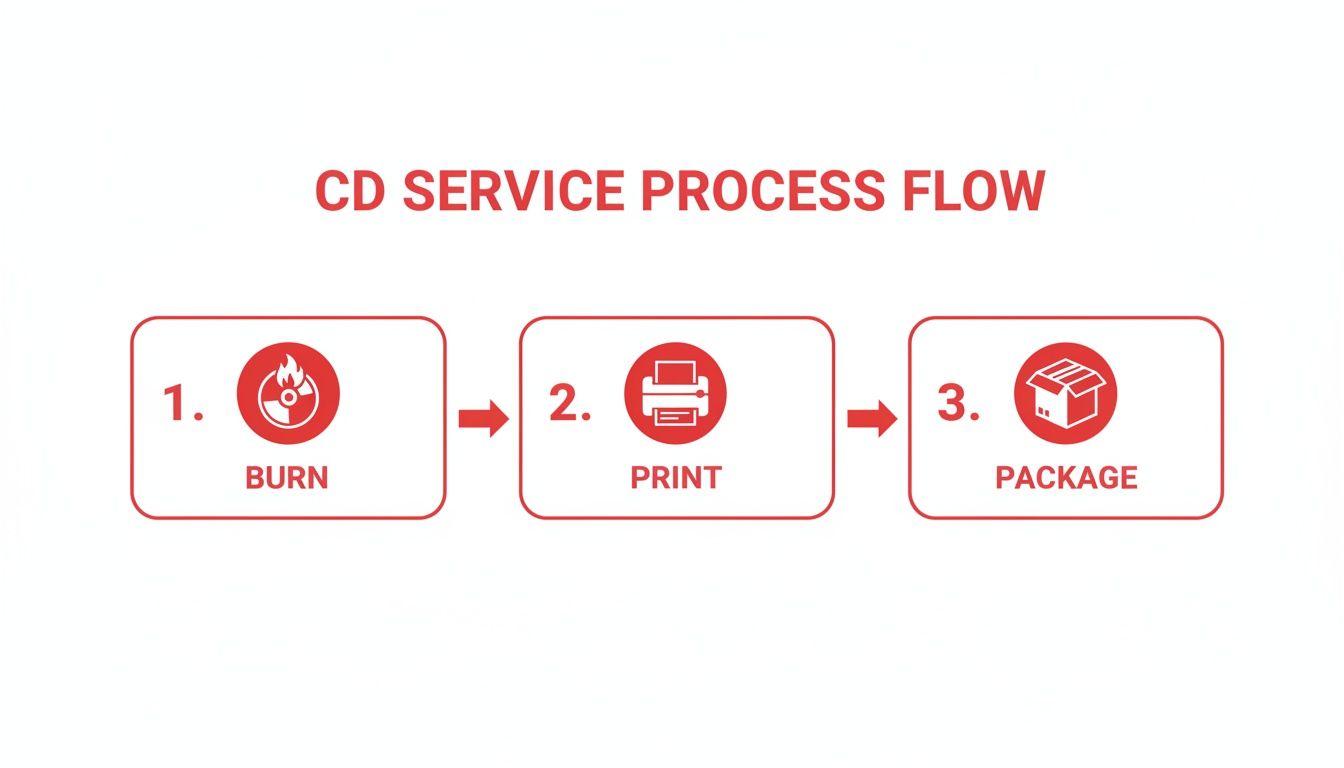
This method is worlds away from burning discs one by one on a laptop. The professional equipment we use ensures consistency and reliability across your entire run. It’s a big business, too—the global market for this machinery was valued at around USD 159 million and continues to serve industries from media production to finance.
Step 3: Professional On-Disc Printing
Once your audio is burned onto the discs, it’s time to make them look good. We’re not talking about those sticky paper labels you used in the 2000s that always seemed to peel off. A professional service uses high-end printers to apply your artwork directly onto the surface of the disc.
This direct-to-disc printing delivers a sharp, vibrant, and permanent finish that looks like it belongs on a store shelf. We often use UV-cured ink, which makes the print resistant to smudges, water, and fading, keeping your CDs looking great for years.
The combination of precise data burning and high-resolution on-disc printing is what separates a professional duplication service from a DIY project. It delivers both functional reliability and aesthetic polish.
Choosing Your Method: Duplication vs. Replication
It’s important to know that “duplication” (burning) is best for smaller runs. For massive orders, the industry uses a different method called “replication” (stamping). Here’s a quick breakdown to help you see the difference.
| Feature | CD Duplication (Burning) | CD Replication (Stamping) |
|---|---|---|
| Process | Burning data with a laser onto a CD-R | Physically stamping data into the disc from a glass master |
| Best For | Small to medium runs (1 to 500 units) | Large runs (500+ units) |
| Turnaround | Fast (often 1-5 business days) | Longer (7-10 business days) due to setup |
| Cost | Higher per-unit cost | Lower per-unit cost at high volumes |
| Setup Fee | Usually no setup fee | Requires a one-time glass master fee |
While we specialize in high-quality duplication for its speed and flexibility on smaller projects, understanding replication helps you see where your project fits in the broader world of physical media manufacturing.
Step 4: Assembly and Final Packaging
The final step is where everything comes together. The printed, duplicated discs are carefully assembled with your printed materials and placed into the packaging you chose.
This final assembly process includes:
- Inserting Booklets: Your custom-printed booklets or J-cards are placed into the front of the jewel case.
- Adding Tray Cards: The artwork for the back of the case is set behind the plastic tray that holds the CD.
- Placing the Disc: The finished CD is snapped securely onto the hub of the case.
Finally, the finished cases are shrink-wrapped. This isn’t just for looks—it protects them from scuffs and scratches during shipping and gives them that professional, retail-ready feel. From there, we box up your order and ship it directly to you, ready for your album release, wedding, or big event.
When Is a CD Duplication Service the Right Move?
You might think CDs are a thing of the past, but a professional duplication service is surprisingly useful for anyone looking to make a real-world connection. In an age of endless digital files, handing someone a physical object is a powerful move. It’s the perfect way to share a memory, promote your work, or deliver important info with a level of polish that an email just can’t match.
Let’s break down a few scenarios where getting CDs made is a brilliant idea.
For musicians, especially indie artists, CD duplication is a lifeline. It lets you get high-quality, professional-looking EPs and albums made for your merch table, but without the daunting cost and commitment of a massive replication order.
Think about it: you’ve got a big gig next month. With duplication, you can order a small run of just 50 or 100 copies of your new EP. This gives your fans a tangible piece of your music to take home, creates a stronger bond, and—let’s be honest—gives you a crucial source of income at your shows.
Perfect for Parties, Weddings, and Corporate Events
It’s not just for bands, though. CD duplication is a fantastic tool for event planners and anyone marking a special occasion. You’re not just handing out a plastic disc; you’re creating a keepsake that people will hold onto long after the event wraps up.
Here are a few ways people put this to use:
- Wedding Favors: Forget the boring bag of almonds. A custom mixtape with the couple’s favorite songs tells a personal story and gives guests a soundtrack to remember the day by.
- Corporate Events: Hand out CDs with the keynote speech, presentation slides, or even a playlist that captured the event’s vibe. It’s a slick way to reinforce your message and make sure it sticks.
- Family Reunions & Anniversaries: Imagine compiling old family audio clips, favorite songs from different generations, or a narrated family history onto a CD. You’re turning fleeting memories into a genuine family heirloom.
A custom CD isn’t just a giveaway—it’s an experience. It’s something tangible people can hold, play, and connect with on a different level.
Even with streaming’s dominance, physical media isn’t dead. The global compact disc market was recently valued at around USD 1.5 billion and is still projected to grow. This shows that services that duplicate CDs are still incredibly relevant for anyone who understands the unique impact of a physical product. You can read more about the surprising resilience of the CD market in this detailed report on the future of physical media from dataintelo.com.
A Smart Tool for Business and Professional Use
In the business world, a professionally made CD sends a message of credibility and seriousness. An email can be deleted with a click, but a physical disc has a certain weight to it. It demands a little more attention and feels more valuable than a random digital file buried in an inbox.
Businesses can use CD duplication for all sorts of practical needs, ensuring that important information gets delivered in a secure, offline format that’s easy for people to access and keep.
Here are a few key examples from the corporate world:
- Software Distribution: For companies sending out software updates or installers, a CD is a reliable, unchangeable medium. No corrupted downloads or broken links.
- Training Materials: Putting training videos, handbooks, and other key documents onto one disc creates a complete, portable learning kit for new team members.
- Marketing Portfolios: Photographers, designers, and architects can create stunning high-res portfolios on CD to mail to potential clients, showcasing their work without worrying about slow internet or clunky file-sharing sites.
Ultimately, choosing to get CDs made is about knowing when a physical object will land with more impact than a digital file. Whether you’re an artist selling your first record, a couple sharing your love story, or a business delivering critical data, a professional CD is a powerful and unforgettable way to connect.
Getting Your Project Ready for Duplication
Getting your project set up for success starts way before you hit that “order” button. Honestly, sending in properly prepared files is the single biggest thing you can do to make the whole process smooth and ensure the final CDs look and sound amazing. Think of it like giving a home builder a perfect set of blueprints—the better the plan, the better the house.
This guide will walk you through the practical steps for getting both your audio and your artwork files in order. We’ll break down the technical stuff in a simple way, helping you sidestep the common mistakes that can cause delays or leave you disappointed. By following these best practices, you’re setting any CD duplication service up to bring your vision to life just how you imagined it.
Nailing Your Audio Files
The sound quality of your finished CD is a direct reflection of the audio files you send us. A duplication service can only copy the data it’s given, so a low-quality MP3 will always result in a low-quality CD. It’s the classic “garbage in, garbage out” scenario.
If you want that rich, professional sound you’ve been working on, you absolutely have to start with the best source material possible.
Here’s a quick checklist to make sure your audio is ready to go:
- Use High-Resolution Formats: Always, always submit your audio in a lossless, uncompressed format. WAV or AIFF files are the industry standard for a very good reason. They contain every bit of the original audio data, unlike compressed formats like MP3s, which literally throw information away to reduce file size.
- Finalize Your Track Order: Before you send anything, double-check that your songs are numbered and named in the exact sequence you want them to play on the CD (e.g., 01_Song_Title.wav, 02_Another_Song.wav). It’s a simple step that prevents a ton of confusion down the line.
- Embed Your Metadata: Take a few minutes to embed important info like the artist name, album title, and song titles right into the files. This data, called CD-Text, is what allows car stereos and players to show what’s playing. It’s a small detail that makes a huge professional difference.
Sending a high-quality, finalized master isn’t just a friendly suggestion—it’s the foundation of your entire project. Your duplicated CDs will only ever sound as good as the master files you provide.
Getting Your Artwork Print-Ready
Your CD’s artwork is the first impression—it’s the visual handshake you have with your audience. To get that professional, polished look, your files need to be set up to very specific technical standards. Ignoring these specs is the number one cause of print problems like blurry images, weird colors, or text getting chopped off. Any good CD duplication service will give you templates; you should always use them.
Let’s dig into the essential requirements for your artwork.
Technical Artwork Specifications
Prepping your art for a commercial printer is a completely different ballgame than saving a picture for Instagram. Printers use a different color system and need a much higher resolution to produce sharp, vibrant results.
These are the non-negotiable specs for your artwork files:
- Resolution: Every piece of your artwork—the cover, the tray card, the disc face—must have a resolution of at least 300 DPI (dots per inch). This is the gold standard for high-quality printing. For comparison, web images are usually 72 DPI and will look horribly pixelated and fuzzy if printed.
- Color Mode: Your files must be saved in CMYK color mode, not RGB. RGB is designed for screens (monitors, phones), while CMYK (Cyan, Magenta, Yellow, Black) is the four-color process that all professional printers use. If you submit an RGB file, the colors will shift during conversion, and you probably won’t like the result.
- Bleed and Safety Margins: You have to include a “bleed” area. This is a little extra artwork that extends beyond the final cut line of your design, typically 1/8th of an inch (0.125″) on all sides. It’s a safety net that prevents ugly white edges if the cutting machine shifts by a tiny fraction. On the flip side, you need to keep all your important text and logos inside the “safety margin”—an area safely inside the trim line—to guarantee they don’t get accidentally sliced off.
Understanding Duplication Pricing and Timelines

So, what’s this actually going to cost, and how long will it take? These are the two biggest questions we get, and the honest answer is: it depends. A duplicating cd service isn’t like buying something off the shelf. Think of it more like ordering a custom cake—the price is tailored to exactly what you need.
The final cost and timeline really come down to the choices you make for your project. By understanding the moving parts, you can easily find the sweet spot between a professional-looking product and your budget.
Breaking Down the Costs
No surprise here: the biggest factor in your total cost is the number of discs you order. CD duplication works on a per-unit basis, but the good news is that you get economies of scale. The more you order, the less you pay for each individual CD, which makes bigger runs much more cost-effective.
After quantity, your choice of packaging has the most impact. A simple paper sleeve is going to be a lot friendlier on your wallet than a classic jewel case with a multi-page booklet inside.
Here’s a quick rundown of the main things that determine your project’s price:
- Disc Quantity: The total number of CDs in your order.
- Packaging Type: This can be anything from inexpensive paper or vinyl sleeves to standard jewel cases or premium DigiPaks.
- Printed Materials: The complexity of your printed parts, like a basic two-panel insert versus a full 12-page booklet, will influence the final cost.
- Add-Ons: Extras like professional shrink-wrapping for a retail-ready look or adding a barcode for sales will also be factored in.
To give you a better feel for how these pieces come together, here’s a table with some common project estimates.
Sample CD Duplication Project Costs
This table provides an estimated cost breakdown for common order sizes to help you budget for your project.
| Quantity | Packaging Type | Estimated Price Range |
|---|---|---|
| 50 CDs | Slim Jewel Cases | $150 – $250 |
| 100 CDs | Standard Jewel Cases | $250 – $400 |
| 250 CDs | Eco-Friendly Sleeves | $450 – $600 |
Keep in mind these are just ballpark figures. Your final quote will depend on the exact specifications you choose.
Planning Your Project Timeline
Just like pricing, the turnaround time for a duplicating CD service isn’t set in stone. A simple job—say, 50 CDs in basic sleeves—could be out the door in just a couple of business days. On the other hand, a larger, more complex order with intricate packaging is going to need a bit more time on the production floor.
The clock officially starts ticking once we have your final, approved audio and artwork files. From that point, most duplication projects take between 2 to 7 business days to complete before they’re ready to ship.
Remember, the timeline starts after you’ve approved all proofs and submitted perfect, print-ready files. Any delays in file submission or requests for revisions will extend your project’s completion date.
Larger orders naturally take a little longer, and choosing to get a physical proof will add a few days to the timeline. While it slows things down slightly, getting that proof in your hands is the best way to guarantee you’ll be 100% happy with the final product. It’s a classic trade-off between speed and certainty.
Even with streaming, the demand for physical media is surprisingly strong. The duplication disc market was recently valued at around USD 1.18 billion and is expected to keep growing. This shows that artists, bands, and businesses still see incredible value in a tangible product. You can dig into the numbers yourself by reading the full report on strategicmarketresearch.com. A little bit of planning goes a long way in making sure your project gets the attention and quality it deserves.
Common Questions About Duplicating CDs
As you start putting the finishing touches on your project, it’s completely normal for a few practical questions to come up. This is where the rubber meets the road—from figuring out order sizes to making sure everything is above board legally. We’ve gathered the most common questions we hear and answered them plainly to help you move forward with confidence.
Think of this as your final sanity check, making sure every box is ticked so your project turns out exactly how you envisioned.
What Is the Minimum Order for Duplicated CDs?
One of the best things about CD duplication is its flexibility, especially if you don’t need a massive number of discs. Unlike replication, which demands a huge commitment upfront, duplication is built for smaller, more focused projects.
Most professional services, including ours, will let you order as few as 25 or 50 copies. This low minimum order quantity (MOQ) makes getting professional-quality CDs incredibly accessible and budget-friendly.
This flexibility is a game-changer for:
- Independent Artists who need a small batch of EPs for a gig without getting stuck with boxes of unsold albums.
- Personal Projects, like making custom mixtapes for a wedding or anniversary where you only need a specific number of gifts.
- Small Businesses testing out a new training module or promotional portfolio without tying up cash in a huge inventory.
It’s always a good idea to double-check the exact MOQ with your chosen service, but you can rest easy knowing that duplication is designed to bring your project to life, no matter the scale.
Can I Use Music From Spotify or Apple Music?
This is a really important one, and the answer is a hard no. You absolutely must own the rights to any audio you plan on duplicating, or you need to have clear, written permission from whoever does. Music you stream from services like Spotify, Apple Music, or YouTube is only licensed for you to listen to personally.
Think of it like renting a movie from a streaming service. You have permission to watch it at home, but you can’t legally make copies to sell or hand out to friends. CD duplication services are bound by the same legal and ethical rules.
Any attempt to use copyrighted material you don’t own is illegal. Professional duplication companies will immediately reject projects that contain protected content without the proper licensing to avoid violating copyright law.
If you want to include cover songs on your album, you’ll need to secure what’s called a mechanical license. This is a legal requirement that makes sure the original songwriter is paid for their work. Thankfully, getting these licenses is a pretty straightforward process these days through services that specialize in music licensing.
Duplication vs. Replication: What’s the Real Difference?
While both duplication and replication create copies of a CD, how they do it couldn’t be more different. Getting this distinction is key to picking the right path for your project’s size, budget, and timeline. It’s kind of like the difference between 3D printing a prototype versus setting up an entire factory assembly line.
CD Duplication is like burning. It uses a high-precision laser to write your data directly onto a professional-grade, blank CD-R. This method is perfect for smaller orders (usually anything under 1,000 units) because it’s quick, has virtually no setup costs, and can be turned around fast.
CD Replication is like stamping. This process is much more industrial. It starts by creating a “glass master”—a physical mold of your data. This mold is then used to physically press the data into molten polycarbonate, which cools to become the disc. It’s incredibly cost-effective for huge quantities (1,000+ units) and is the standard for major retail releases, but it takes longer and has higher initial setup costs to create that glass master.
Here’s a simple way to look at it:
| Feature | CD Duplication (Burning) | CD Replication (Stamping) |
|---|---|---|
| Best For | Small to medium runs (25-500) | Large runs (1000+) |
| Turnaround | Fast (2-7 business days) | Slower (7-10+ business days) |
| Cost | Higher per disc, no setup fee | Lower per disc, has a setup fee |
For most indie artists, event planners, and small businesses, duplication is hands-down the more practical and economical choice.
How Long Will My Duplicated CDs Actually Last?
There’s a common myth that burned CDs are flimsy and won’t last. While that might have been true for those cheap, colorful discs you bought in a spindle back in the 2000s, technology has improved dramatically. Professional duplication services use archival-grade CD-Rs built for the long haul.
When you store them properly, these high-quality duplicated discs are incredibly resilient. They’re often rated to last for 50 to 100 years, or even longer, making them a fantastic way to preserve music, memories, and important files for decades.
To get the most out of them, just follow a few simple storage tips:
- Keep them cool and dark. Store CDs away from direct sunlight and big temperature swings. A closet or a drawer is perfect.
- Avoid humidity. A dry environment is key to preventing the sensitive layers of the disc from degrading over time.
- Use proper cases. Storing them in jewel cases or protective sleeves is the best way to prevent scratches on the shiny data side.
By taking these basic precautions, you can be confident that the CDs you make today will still be playing perfectly for friends, family, or fans many years from now.
Ready to turn that perfect playlist into a tangible mixtape you can share? At Mixtape Duplication, we make it simple to create a professional, personalized CD for any occasion. Let us handle the technical stuff so you can focus on the music. www.musicmediaone.com